
Article · Copilot Studio
Building AI agents is easy. Building Reliable Ones? Not So Much.
Everyone wants to build an AI agent. Unfortunately, very few know how to build the architecture that makes the agent reliable. These are six lessons from building agents that had to survive real work.
Over the past few months I’ve built several production-oriented agents in Microsoft Copilot Studio.
One helped underwriters evaluate hard-money loans. Another pulled metadata out of images and complex engineering diagrams. Others managed contract registries, extracted the key terms from legal agreements, ran business workflows, or surfaced enterprise knowledge inside Teams.
On the surface these projects had nothing in common. Underneath, they all taught me the same thing: building the agent is the easy part, especially on a low-code platform like Copilot Studio. The hard part, and sometimes the painful part, is everything you have to build around it.

That one realisation changed how I approach enterprise AI. Most articles, LinkedIn posts, and AI influencers sell a picture of agent development that looks like this:
Documents → AI → Answers
It’s an appealing story. Point an agent at your documents, connect SharePoint and a few APIs, ask questions, and watch it work. The reality is messier. It looks more like this:
Identify documents → Clean the data → Extract key information → Structure metadata → Business systems → AI → Human review → Business process
The AI is one component. Everything around it decides whether the thing actually works. That’s the pattern behind every lesson below. Reliable agents don’t start with a clever prompt you copied from somewhere. They start with the data, workflows, and governance that make the agent useful at all.
The first shift is understanding what Copilot Studio is really for.
Lesson 1: Copilot Studio is an orchestration platform, not a knowledge platform
The most common mistake I see is treating Copilot Studio as a giant document brain. It isn’t one. Its real strength isn’t answering questions, it’s coordinating work.
I learned that the hard way. For days I couldn’t get accuracy past 50% using the “just point the agent at the knowledge source” approach, and this was a controlled test environment inside my own tenant, with data I knew well. Ideal conditions, and the results were still poor.
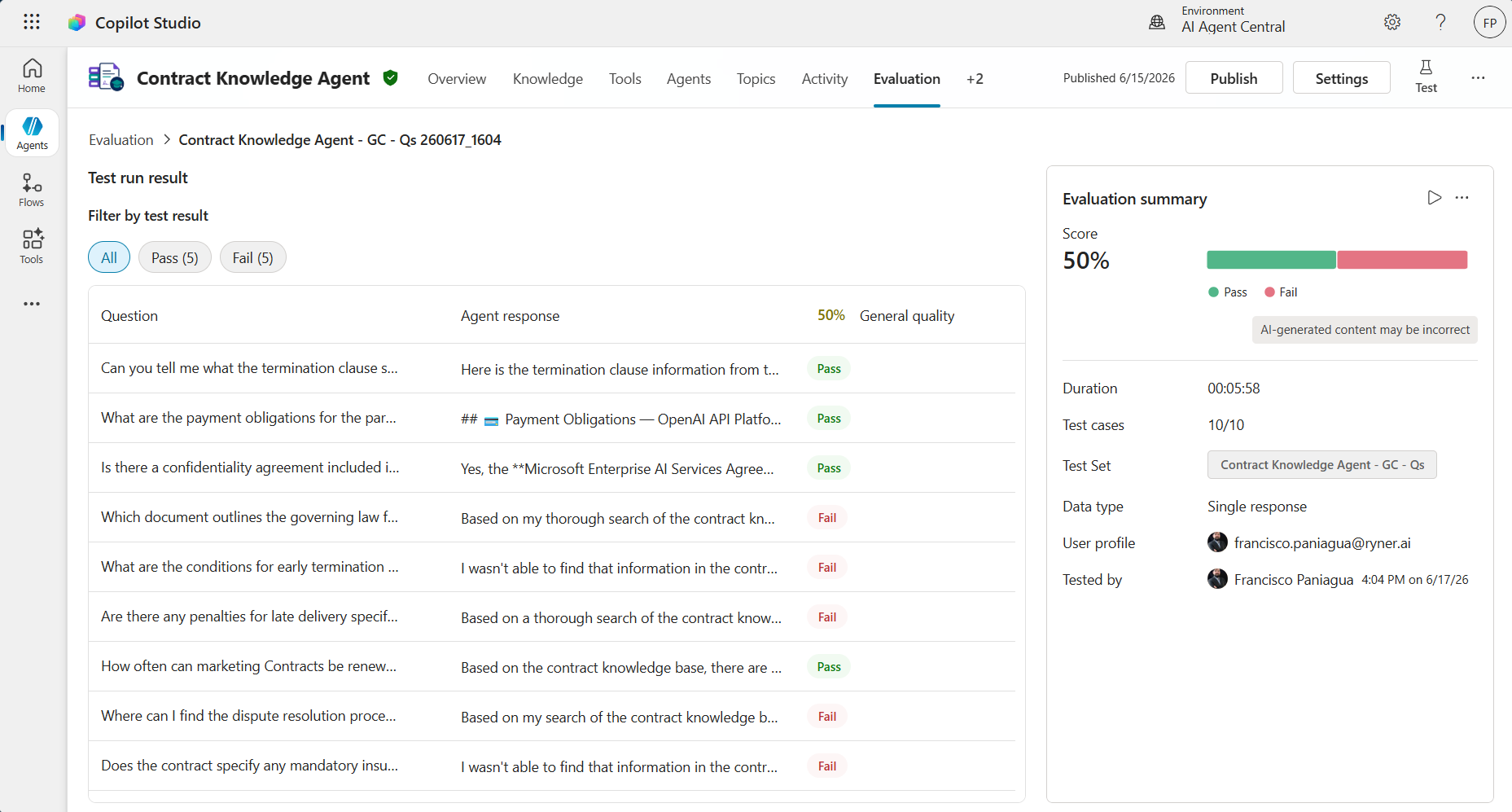
When I look back at the agents and automations that delivered the most value, very few were “chat with your documents.” They looked more like this:
- Retrieve a customer or contract.
- Summarise the current state.
- Ask for whatever information is missing.
- Trigger a Power Automate flow.
- Create or update a Dataverse record.
- Call Microsoft Graph, route an approval, and present the result inside Teams.
That’s the work Copilot Studio is good at, and not because the language model is especially clever. It’s because it sits in the middle of the Microsoft ecosystem and moves work across it. If you’re already invested in Microsoft 365, that positioning is worth a lot. Teams becomes the front door, Dataverse the operational system, SharePoint the document store, and Power Automate runs the deterministic steps. Copilot Studio just orchestrates the conversation. Everything does the job it was built for.
Lesson 2: Documents alone aren’t knowledge. Metadata is key.
This was the biggest lesson of the lot. Like most people, my first instinct was to go with an out-of-the-box approach: connect a SharePoint library and surely the agent will understand my documents. Spoiler alert: it didn’t. The most confusing part was that I’d tested this before with SharePoint agents and it had worked perfectly.
The premise looked simple enough: put into production an agent grounded against a large SharePoint library. Ask questions, get accurate answers, that was the expectation. Instead, retrieval became the bottleneck. The model wasn’t hallucinating. It simply couldn’t find the right information in the first place.
Documents are evidence. They are not operational knowledge. An agent can only reason over what retrieval actually feeds into its context window.
That experiment changed how I design agents. In a low-code tool like Copilot Studio you have far less control over that retrieval, and how much it pulls, than you’d get building your own RAG pipeline (which is not something organizations can do for every use case). So, if a business process depends on knowing contract expiry dates, vendor names, jurisdictions, renewal terms, or risk categories, those facts shouldn’t be buried inside massive PDF libraries. They belong in structured storage.
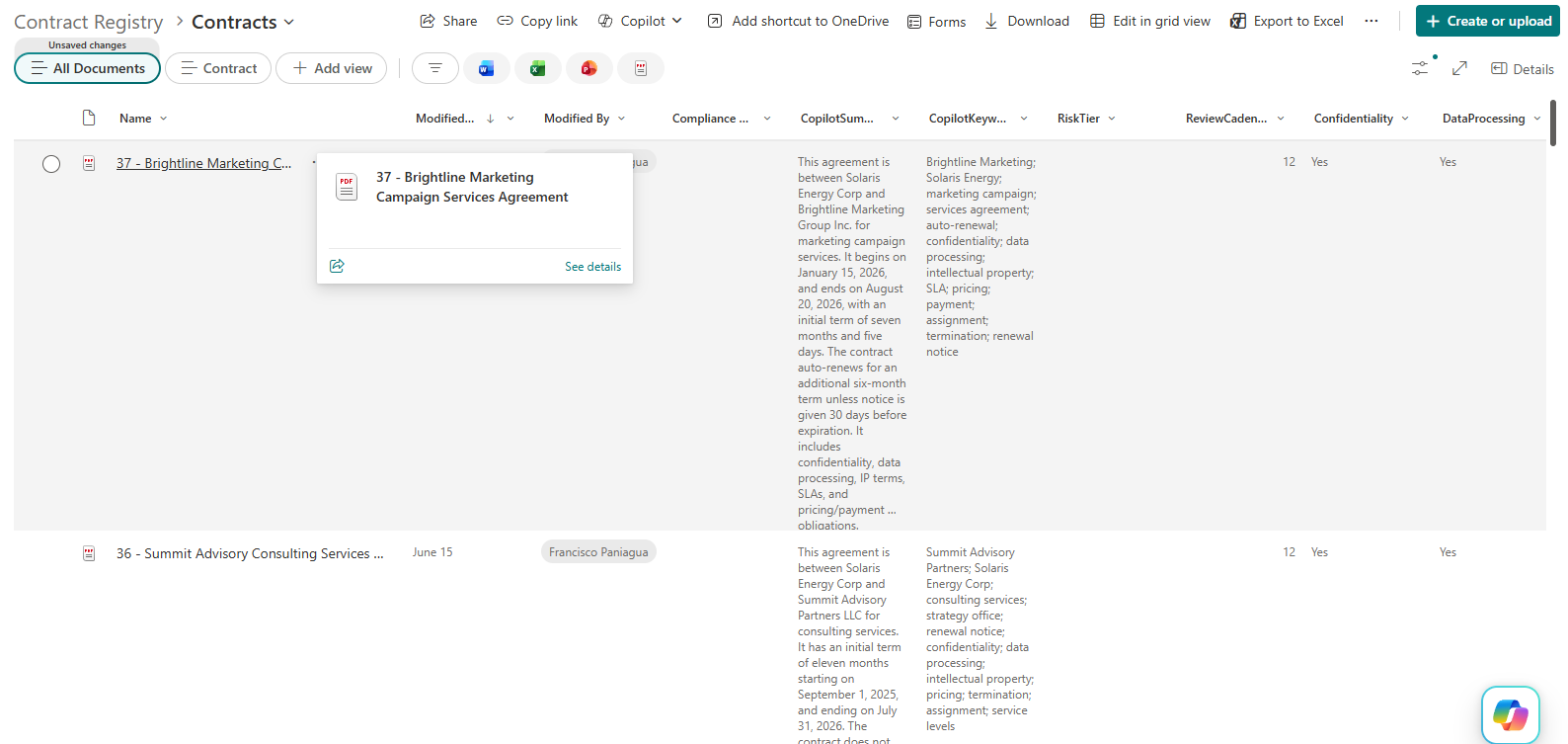
Extracting key metadata turned out to be the turning point on almost every project that worked. Rather than asking an LLM to infer business facts from hundreds of documents, I extracted the facts with AI Builder, validated them, stored them, and let Copilot Studio orchestrate the experience.
Lesson 3: Prompt engineering can’t rescue bad architecture
Prompt engineering matters, just not as much as people want it to. I’ve watched teams spend days rewriting prompts to fix problems that were really caused by poor retrieval, missing metadata, or source documents that contradicted each other.
A better prompt won’t fix duplicate contracts, conflicting versions of the same file, missing structured data, weak retrieval, or a business process nobody has actually defined. Architecture wins every time.
Once I started seeing agents that way, troubleshooting got simpler. When an answer came back wrong, I stopped asking how to rewrite the prompt and started asking which part of the architecture had failed. Those are very different questions, and only one of them leads anywhere.
Lesson 4: Let deterministic systems do deterministic work. Not every problem needs an agent
Over the past year, nearly every major AI development has been about agents, which is understandable. Agents are exciting. They can reason, plan, call tools, and adapt to context. None of that makes them the right answer by default.
So one of the first questions I ask in a discovery session is almost boringly simple: does this process actually require reasoning? If it needs reasoning, does the right next step of the process depend on context you can’t reduce to a flowchart? If the answer is no, I don’t need an agent. I need good intelligent automation. Every time I ask an LLM to behave like a database, accuracy gets worse. Every time I let the business systems do what they were built for, reliability gets better. Need the contracts expiring next month? Query Dataverse. Need totals? Use Copilot Studio Workflows. Need structured facts? Read the database, then let the model explain what came back.
LLMs are excellent reasoning engines and terrible relational databases.
Take contract intake for example. A document arrives, metadata is extracted, a Dataverse record is created, the document is classified, approvals fire, notifications go out. Every step follows a predictable path, and the same input should give the same output every time. That’s deterministic automation with a reasoning component (metadata extraction), and it’s exactly what you want there.
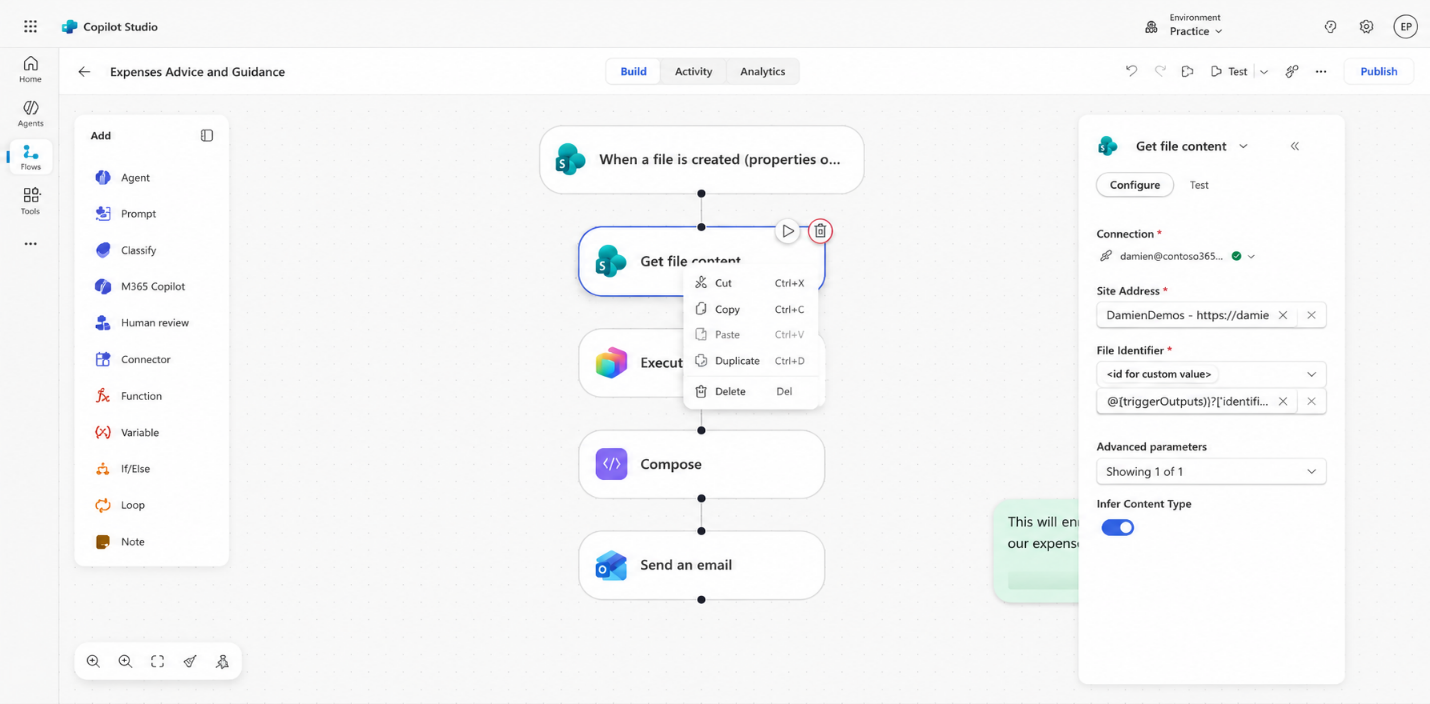
Now compare that with a commercial loan underwriting agent. It has to read financial statements, cross-check borrower details across several documents, spot inconsistencies, surface risks, and ask follow-up questions when something’s missing. There’s no single correct path. Every deal is different, and every borrower tells a different story. That’s where reasoning through context earns its keep.
The most common architectural mistake I see is pointing an agent at a process that already has a perfectly good defined path. The best enterprise systems I’ve worked on aren’t agent-first at all. They’re automation-first and agent-enhanced: the deterministic workflow handles everything it can do with certainty and only hands off to an agent when it hits genuine ambiguity. Our job isn’t to maximise the agent count. It’s to know where reasoning actually adds value, and where a plain flow is the better engineering call.
Lesson 5: The new Copilot Studio is a different tool than the one we’ve all been using
If you’ve built in Copilot Studio before, you’re about to get a shock when you open it. New interface, and there’s even a toggle to go back to the old experience. I wouldn’t count on that toggle sticking around. Start a new agent and the things you relied on are missing. No topics across the top. A lot of the old furniture is just gone.
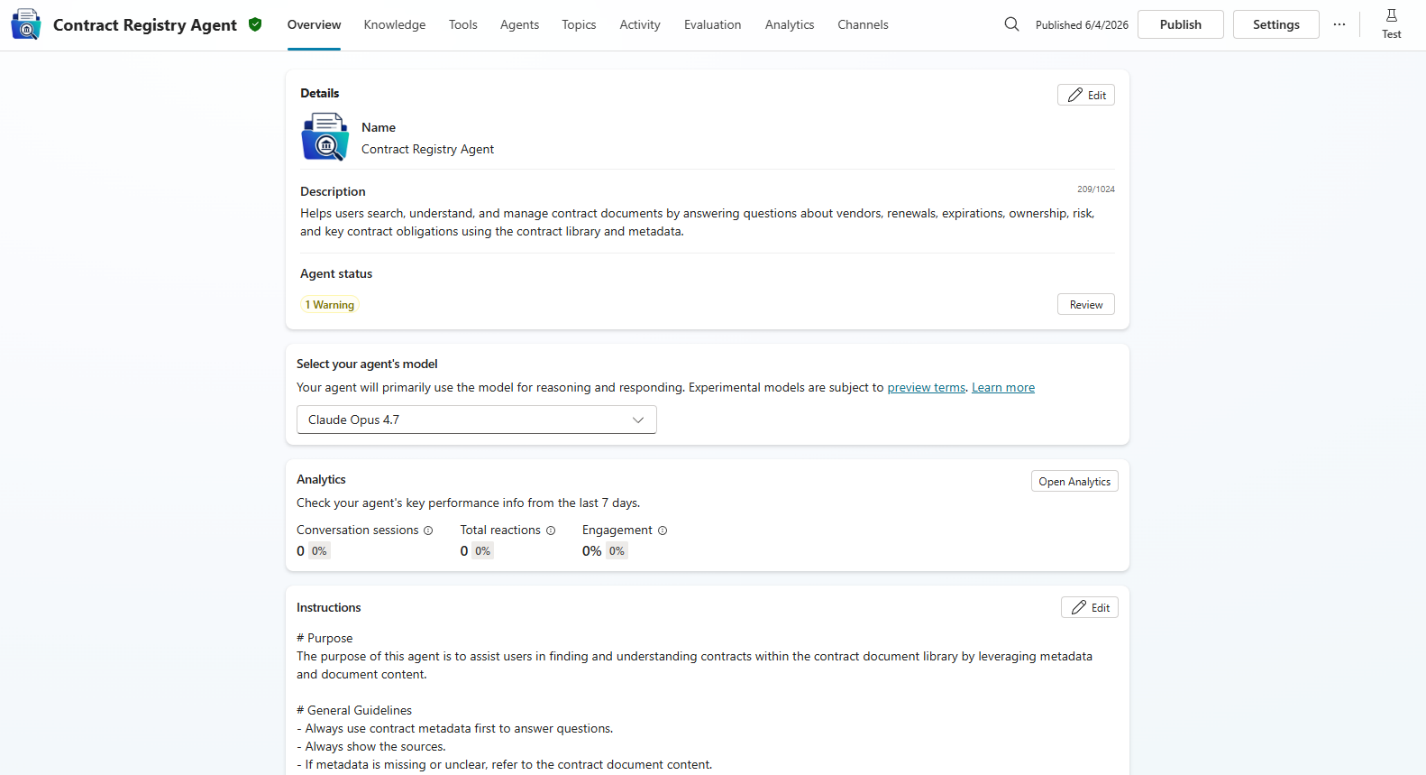
Here’s what actually happened, because it’s more than a redesign. Copilot Studio used to build what were called custom engine agents. They ran on their own orchestrator, a smaller, weaker one than the engine behind Microsoft 365 Copilot. What you’re building now is a declarative agent that runs inside M365 Copilot itself, on the same beefy orchestrator (the one that started life as Sydney) that makes the first-party Copilot results feel as good as they do. If you ever wondered why people kept saying Agent Builder or SharePoint agents gave noticeably better answers than Copilot Studio, that’s the reason. Same question, better engine, and usually better knowledge retrieval underneath.
The old approach carried a lot of inherited debt. Copilot Studio was Power Virtual Agents before large language models existed, a rule-based chatbot tool with some rudimentary language understanding. Microsoft bolted LLMs onto that foundation, but the older plumbing never fully went away. The clearest example was authentication. Custom engine agents leaned on Power Platform connectors, which were fine in a Power App with a real interface but miserable in a chat window. If you were lucky you got an inline approval card. Most of the time you got a link that dumped you into a new browser tab, a login, a pile of clicks to connect SharePoint or Outlook or ServiceNow, then back to chat to hit retry. That experience was rough, and the team never truly fixed it.
The new declarative agents sidestep all of it. The tools now run on Microsoft’s MCP servers rather than Power Platform connectors, so authentication and authorisation happen smoothly in the background. You also get things that were a constant fight before, like toggling on memory.
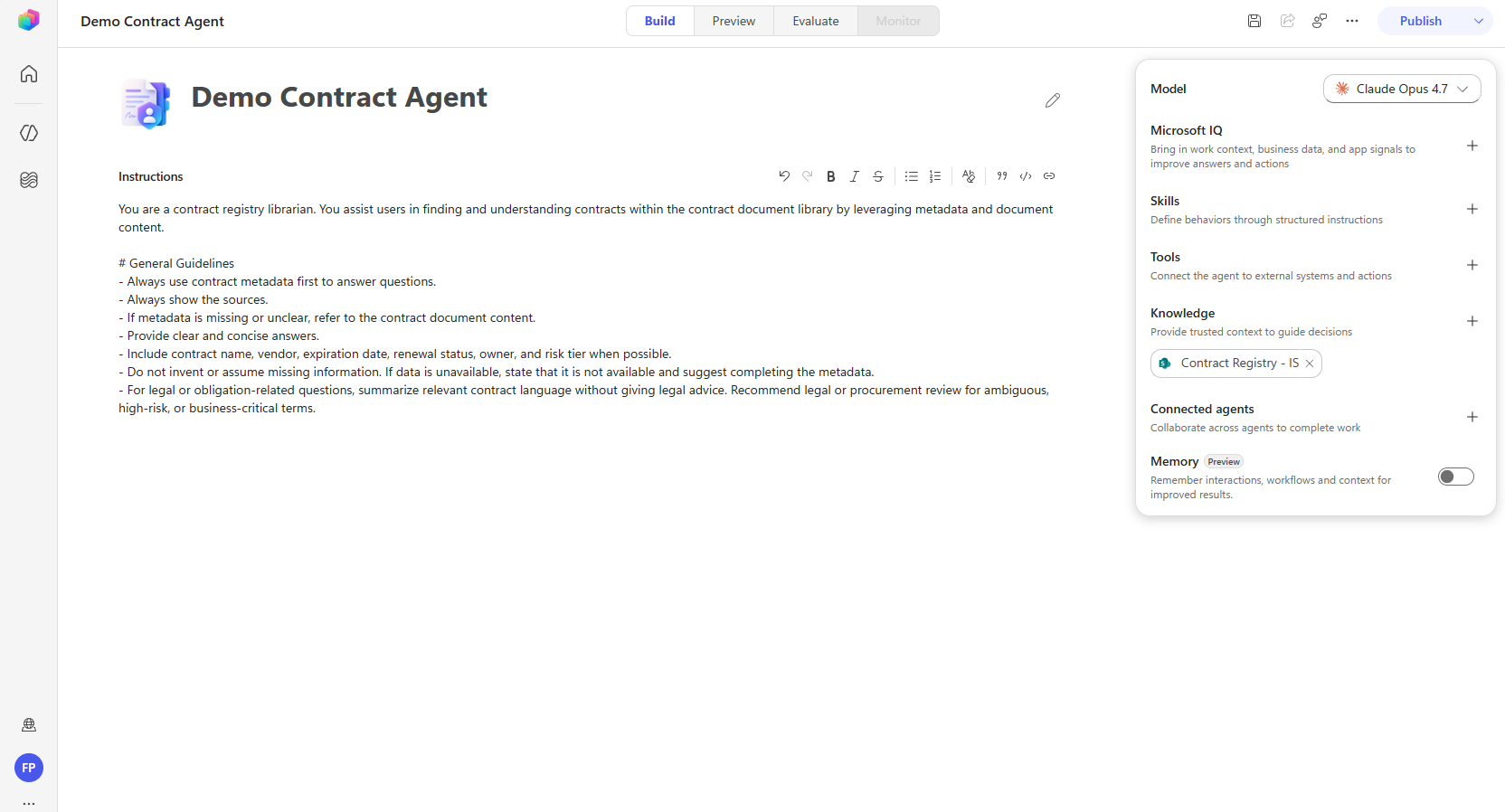
But the change people panic about is the missing topics. “What do I do without topics? How do I structure the conversation?” The honest answer: you mostly shouldn’t have been structuring it that rigidly in the first place. Cram an agent full of scripted steps and it tends to break the moment a user goes off-script, says “actually, let’s start over,” and the agent is still waiting for the input your topic demanded. If you built topic-heavy bots and watched them fall apart like that, now you know why.
So what replaces topics? Three things, in order. Your instructions come first, that’s the primary way you tell the agent what it is and how to behave. Skills are second, and they’re new to Copilot Studio: natural-language, markdown-based descriptions of how a particular conversation path should go, with no drag-and-drop canvas involved. Workflows are third, for the cases where you genuinely need deterministic logic, a gnarly API call, some JSON to process, work a language model shouldn’t be trusted to improvise. These are the same engine you knew as Power Automate, then agent flows, now rebranded again as workflows, with a nicer builder on top.
The mindset this forces is the real point. You stop thinking like a pro-code developer nailing down an exact sequence, and start teaching the agent how to navigate the conversation, giving it good tool definitions and clear instructions, then leaving it room to work. You test, you tweak the instructions and the markdown, and you end up with something far more flexible than the old logic trees.
Declarative agents do have a ceiling: you can’t specify every piece of rigid logic, and sometimes you truly need that. When you hit something the new Copilot Studio simply can’t do, that’s the signal to move to a pro-code agent, the M365 Agent SDK, the Teams SDK, Foundry to host or call the model, where you get full control instead of bending a low-code platform into a shape it resents.
That’s why I think Microsoft made the switch. Declarative-first puts Copilot Studio on par with Agent Builder, which was quietly excellent all along and written off by people who assumed it was just for sharing agents. The lesson for the rest of us is the same one this whole article keeps circling: keep it lightweight, set good guardrails, and let the technology take the lead instead of burying your organisation in technical debt.
What building these agents actually taught me
The more time I spend in Copilot Studio, the less I see it as an “AI tool” and the more it looks like an orchestration layer.
The AI matters, but it’s one piece. The hard part is everything around it: connecting the right data, understanding the process, handling the exceptions, and making the experience actually work for the person using it. Get those right and the agent feels smart. Get them wrong and you end up trying to fix architecture problems with better prompts, and that doesn’t scale.
That’s been my biggest lesson from these projects.
Enterprise AI won’t be won by whoever writes the perfect prompt. It’ll be won by the teams that build the right foundation underneath it.